> For the complete documentation index, see [llms.txt](https://help.transmutr.com/llms.txt). Markdown versions of documentation pages are available by appending `.md` to page URLs; this page is available as [Markdown](https://help.transmutr.com/v2-ko/undefined-1/viewport.md).

# 뷰포트

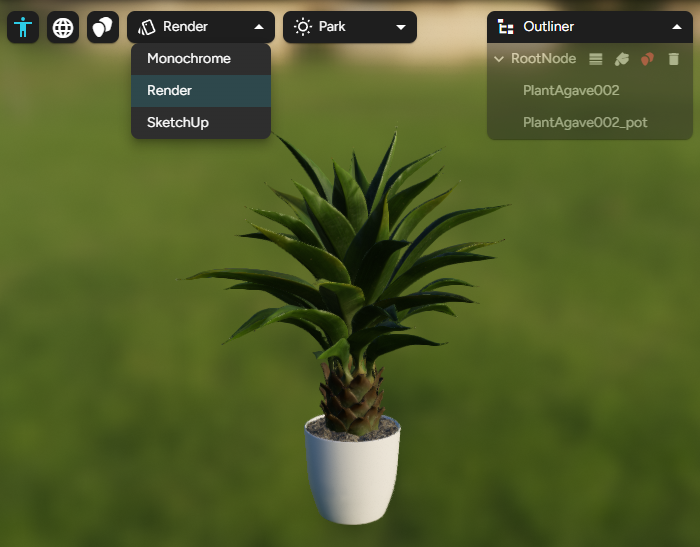
뷰포트는 불러온 모델 또는 재질의 실시간 미리보기입니다.

<figure><img src="https://3190554567-files.gitbook.io/~/files/v0/b/gitbook-x-prod.appspot.com/o/spaces%2F1es0Q41xgKIsp2DHp0NC%2Fuploads%2Fgit-blob-750e707f9978cc6de3e6f9e377f56e3162bc4f7e%2FScreenshot%202026-08-13%20165614.png?alt=media" alt=""><figcaption></figcaption></figure>

## 카메라 컨트롤

<table><thead><tr><th width="194">동작</th><th>컨트롤</th></tr></thead><tbody><tr><td>궤도 회전</td><td>가운데 마우스 버튼(SketchUp 방식)</td></tr><tr><td>화면 이동</td><td>Shift + 가운데 마우스 버튼</td></tr><tr><td>확대/축소</td><td>스크롤 휠</td></tr><tr><td>범위 확대/축소</td><td><strong>범위 확대/축소</strong> 버튼</td></tr><tr><td>자유 시점</td><td><strong>마우스 오른쪽 버튼</strong>을 누른 채 마우스를 이동</td></tr><tr><td>비행</td><td>탐색 중 <strong>W / A / S / D</strong></td></tr><tr><td>비행 속도</td><td><strong>위쪽 / 아래쪽</strong> 화살표 키</td></tr></tbody></table>

## 미리보기 모드(형상 모델) <a href="#preview-modes-geometry-models" id="preview-modes-geometry-models"></a>

<table><thead><tr><th width="191">모드</th><th>보이는 내용</th></tr></thead><tbody><tr><td><strong>SketchUp</strong></td><td>해당되는 경우 가장자리가 있는, SketchUp과 비슷한 음영 뷰</td></tr><tr><td><strong>단색</strong></td><td>재질을 숨겨 형태와 볼륨을 판단할 수 있는 점토 같은 모습</td></tr><tr><td><strong>렌더링</strong></td><td>재질을 확인하기에 적합한 사실적인 PBR 미리보기</td></tr></tbody></table>

### 환경(렌더링 모드) <a href="#environments-render-mode" id="environments-render-mode"></a>

**렌더링** 모드에서 조명을 바꿀 환경을 선택하십시오. 아파트, 도시, 새벽, 숲, 로비, 밤, 공원, 스튜디오, 일몰, 창고.

## 표시 전환

<table><thead><tr><th width="257">전환</th><th>용도</th></tr></thead><tbody><tr><td><strong>축척 인물 표시</strong></td><td>축척 기준이 되는 SketchUp 방식의 인물</td></tr><tr><td><strong>와이어프레임 표시</strong></td><td>토폴로지를 확인하도록 모든 메시 가장자리를 겹쳐 표시</td></tr><tr><td><strong>블롭 표시</strong></td><td>블롭 프록시 유형에 쓰이는 블롭 볼륨을 시각화</td></tr></tbody></table>

## 재질만 미리보기

[형상 없이 텍스처](/v2-ko/undefined/materials-only.md)를 변환하면 뷰포트는 메시 대신 **구**와 **평면** 미리보기를 제공합니다. 형상에만 해당하는 전환(와이어프레임, 축척 인물, 블롭, 아웃라이너)은 숨겨집니다.

## 재질과의 상호 작용

* **재질** 탭이 활성인 상태에서 개체를 클릭하면 해당 재질을 확인할 수 있습니다.
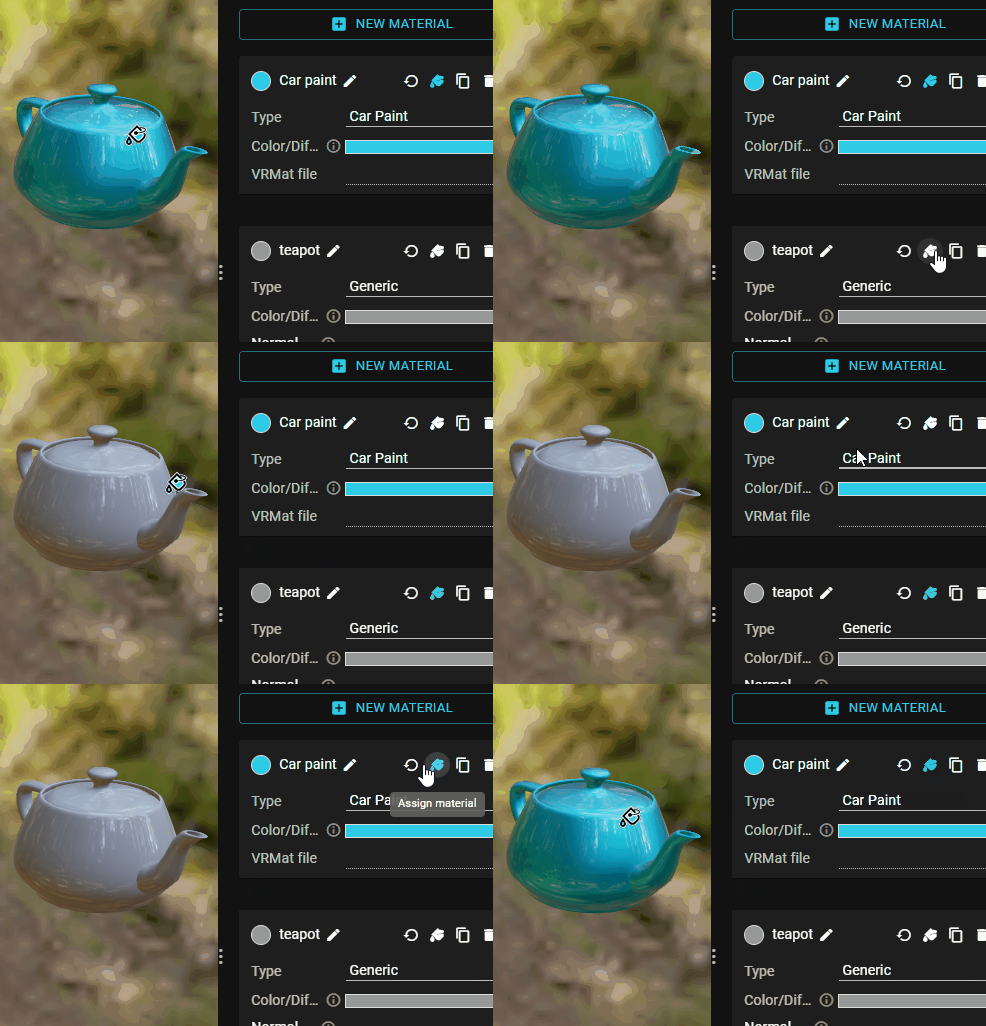
* 페인트통 **재질 할당** 도구를 사용한 다음 뷰포트에서 메시를 클릭하여 칠하십시오. 아웃라이너에서도 할당할 수 있습니다.

<figure><img src="https://3190554567-files.gitbook.io/~/files/v0/b/gitbook-x-prod.appspot.com/o/spaces%2F1es0Q41xgKIsp2DHp0NC%2Fuploads%2Fgit-blob-19ca2b6f373f8fd89fb7eb27e62f85f4498d2a91%2Fassign-material.gif?alt=media" alt=""><figcaption></figcaption></figure>