> For the complete documentation index, see [llms.txt](https://help.transmutr.com/llms.txt). Markdown versions of documentation pages are available by appending `.md` to page URLs; this page is available as [Markdown](https://help.transmutr.com/v2-zh-tw/bian-ji/interface.md).

# 介面

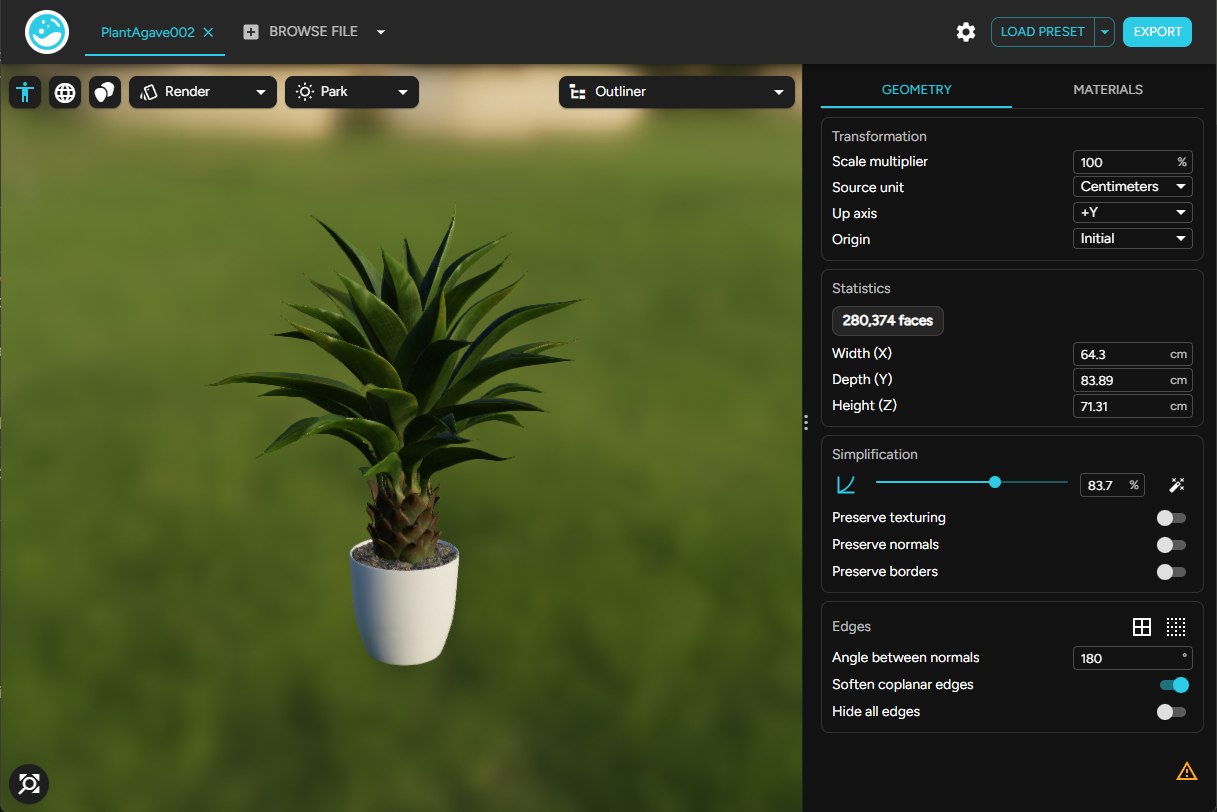
模型載入後，Transmutr 會在左側顯示即時預覽，在右側顯示設定。

<figure><img src="https://130293220-files.gitbook.io/~/files/v0/b/gitbook-x-prod.appspot.com/o/spaces%2F6iM39Fu7IHo8ZZFF3lma%2Fuploads%2Fgit-blob-b2d5970f11e548524f70a50c085366f04174a817%2FScreenshot%202026-08-13%20165410.png?alt=media" alt=""><figcaption></figcaption></figure>

## 工具列

<table><thead><tr><th width="240">控制項</th><th>用途</th></tr></thead><tbody><tr><td><strong>模型分頁</strong></td><td>在開啟的模型之間切換（<a href="/v2-zh-tw/bian-ji/batch-conversion.md">僅 Studio／Creator</a>）。按一下「<strong>瀏覽檔案</strong>」可再開啟一個。</td></tr><tr><td><strong>選項</strong></td><td>授權、介面偏好、外部工具、SketchUp 連線。請參閱<a href="/v2-zh-tw/sketchup-yu-she-ding/options.md">選項</a></td></tr><tr><td><strong>載入預設集</strong>／<strong>儲存預設集</strong></td><td>重複使用幾何體、材質與自動化設定。請參閱<a href="/v2-zh-tw/bian-ji/presets.md">預設集</a></td></tr><tr><td><strong>重設設定</strong></td><td>清除幾何體／材質覆寫，恢復為預設值（以介面中可用的項目為準）。</td></tr><tr><td><strong>匯出</strong></td><td>開啟匯出設定並儲存 <code>.skp</code>。請參閱<a href="/v2-zh-tw/hui-chu/export.md">匯出</a></td></tr></tbody></table>

## 預覽

[3D 檢視](/v2-zh-tw/bian-ji/viewport.md)以類似 SketchUp 的導覽方式顯示模型，並加上飛行控制。預覽模式、線框、比例人物與[大綱](/v2-zh-tw/bian-ji/outliner.md)都在這裡。

## 側邊面板

兩個分頁：

* [**幾何體**](/v2-zh-tw/bian-ji/geometry.md)：變換、統計資料、簡化、邊線
* [**材質**](/v2-zh-tw/bian-ji/materials.md)：PBR 材質、貼圖、自動化（Studio／Creator）、指派工具

[僅材質](/v2-zh-tw/hui-ru/materials-only.md)的匯入會隱藏幾何體分頁與大綱。

## 共用設定（Studio／Creator）

開啟多個模型時，大多數幾何體設定會套用到**所有**分頁。使用設定旁的連結／覆寫控制項，即可只自訂一個模型。請參閱[批次轉換](/v2-zh-tw/bian-ji/batch-conversion.md)